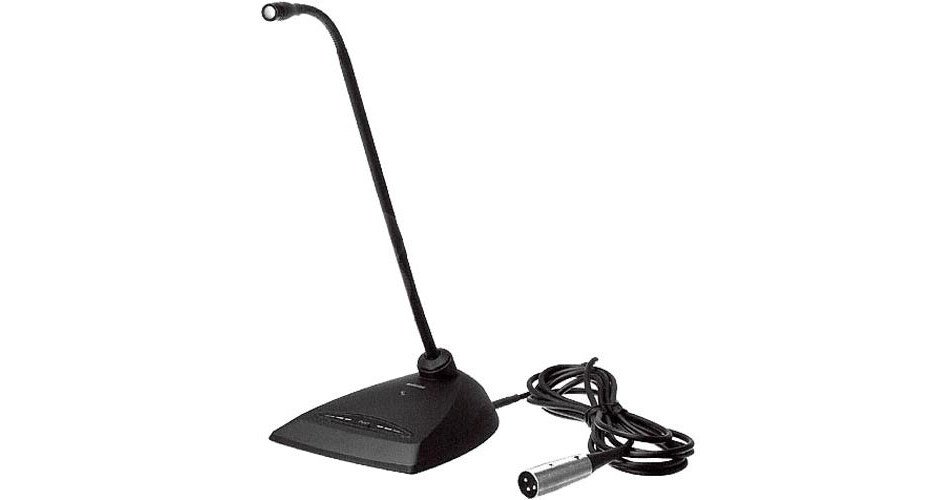
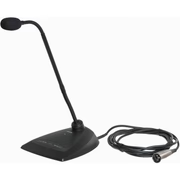
Shure MX412D/S 12″ Supercardioid Gooseneck Microphone

Shure MX412D/S 12″ Supercardioid Gooseneck Microphone

12″ Microflex® MX400D Series Standard Supercardioid Desktop Gooseneck Microphone

Overview

Shure Microflex® MX400D Series microphones are miniature electret condenser gooseneck microphones with a desktop base and a 4.3 m (14 ft.) cable. Desktop base allows microphones to be used in multi-purpose rooms where quick setup is required, or where permanent installation is impractical.

  • Wide dynamic range and frequency response for accurate sound reproduction
  • Interchangeable cartridges that provide a choice of polar pattern for each application
  • Programmable mute button and LED indicator
  • Logic input and output terminals for remote control or use with automatic microphone mixers
  • Balanced, transformerless output for increased immunity to noise over long cable runs
  • RF filtering

Interchangeable Cartridges
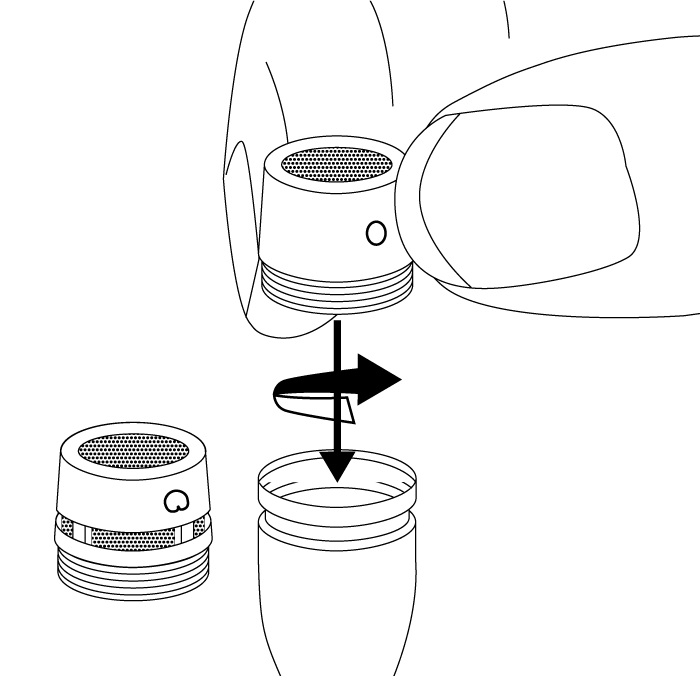
Microflex microphones use interchangeable cartridges that allow you to choose the polar pattern for different installations.

Snap-Fit Windscreen

  • Snap into the groove below the cartridge.
  • To remove, spread the gap with a screwdriver or thumbnail.
  • Provides 30 dB of “pop” protection.

Microphone Placement

  • Aim the microphone toward the desired source, such as the talker.
  • Aim it away from any unwanted source, such as a loudspeaker.
  • Place the tip of the microphone within 15 to 30 cm (6 to 12 inches) of the desired sound source.
  • Always use the supplied windscreen or optional metal windscreen to control breath noise.
  • If four or more microphones will be open at the same time, use of an automatic mixer is recommended.

Securing to a Surface

Drill two holes in the mounting surface 50.8 mm (2 in.) apart.

Use #6-32 screws to secure the microphone.

DIP Switches

Use the DIP switches to configure logic settings and mute button behavior.

The DIP switches are covered with a piece of clear tape at the factory. Remove tape to modify the switch settings.

Note: Bottom cover must be closed for microphone to function.

OFF (factory default) ON
1 Momentary Toggle
2 Push-to-mute Push-to-talk
3 Mute button enabled, LED illuminates when mic is active Disable mute button (microphone always on), logic controls LED
4

Wiring Diagram

NOTE: Audio and logic ground are connected at microphone base.

Changing SWITCH OUT to Always Momentary

Use the following modification in situations where your logic interface requires momentary closure of the SWITCH OUT, but you want the mute button to toggle the microphone (DIP switch 1 ON, 3 OFF):

  1. Access the circuit board inside the microphone base.
  2. Remove the resistor at R45 and reinstall it at location R46.

Mute Button Configuration

Use DIP switches 1 and 2 to configure the mute button, as follows.

Be sure to set DIP switch 3 off (factory default) so that the mute button controls audio from the microphone.

Switch Function DIP Switch Setting
Momentary: push-to-mute (as shipped).
Momentary: push-to-talk
Toggle: (Push On/Push Off): Mic is active when powered on
Toggle: (Push On/Push Off): Mic is mute when powered on

Connecting to an Automatic Mixer

Use these settings if connecting the microphone to an automatic mixer or other device that mutes audio and controls the LED.

  1. Connect logic leads to the automatic mixer. Connect the LED IN to the gate output to illuminate the LED when that channel is gated on.
  2. Set DIP switch 3 on. This disbles the mute button (the microphone passes audio regardless of whether the button is pressed or not).
  3. Set DIP switch 1 to configure how the mute button sends SWITCH OUT logic:

Momentary: push = 0 Vdc, release = 5 Vdc

Toggle: initial = 5 Vdc, push = 0 Vdc

Logic Wiring

Green (LOGIC GROUND): Connects to the logic ground of an automatic mixer, switcher, or other equipment.

Orange (LED IN): Set DIP switch 3 on to use LED IN. When shorted to LOGIC GROUND, the LED turns on.

White (SWITCH OUT): Provides TTL logic (0 Vdc or 5 Vdc) in response to the mute button. Set DIP switch 1 for momentary or toggle. When phantom power is applied, logic initializes high (5 Vdc). DIP switch 2 has no effect on SWITCH OUT.

Specifications

Cartridge Type

Electret Condenser

Frequency Response

50–17000 Hz

Polar Pattern

MX412D/C, MX418D/C Cardioid
MX412D/S, MX418D/S Supercardioid

Output Impedance

180 Ω

Output Configuration

Active Balanced

Sensitivity

@ 1 kHz, open circuit voltage

Cardioid –35 dBV/Pa(21  mV)
Supercardioid –34 dBV/Pa(24  mV)

1 Pa=94 dB SPL

Maximum SPL

1 kHz at 1% THD, 1 kΩ load

Cardioid 124 dB
Supercardioid 123 dB

Self Noise

A-weighted

Cardioid 28 dB SPL
Supercardioid 27 dB SPL

Signal-to-Noise Ratio

Ref. 94 dB SPL at 1 kHz

Cardioid 66 dB
Supercardioid 68 dB

Dynamic Range

1 kΩ load, @ 1 kHz

96 dB

Common Mode Rejection

45 dB, minimum

Clipping Level

at 1% THD

–6 dBV (0.5 V)

Polarity

Positive sound pressure on diaphragm produces positive voltage on pin 2 relative to pin 3 of output XLR connector

Weight

MX412D 0.81 kg (1.80 lbs)
MX418D 0.82 kg (1.82 lbs)

Logic Connections

LED IN Active low (≤1.0V), TTL compatible. Absolute maximum voltage: -0.7V to 50V.
LOGIC-OUT Active low (≤0.5V), sinks up to 20mA, TTL compatible. Absolute maximum voltage: -0.7V to 24V (up to 50V through 3kΩ).

Mute Switch

–50 dBminimum

Cable

4.3 m (14 ft) attached cable with shielded audio pair terminated at a 3-pin male XLR and three unterminated conductors for logic control

Environmental Conditions

Operating Temperature –18–57°C (0–135°F)
Storage Temperature –29–74°C (–20–165°F)
Relative Humidity 0–95%

Power Requirements

11–52  V DC, 2.0 mA

Categories , Brand:
Share This Items :

NATIONWIDE DELIVERY

Secure Delivery

AUTHENTIC PRODUCTS

100% Original Items

Description

Overview

Shure Microflex® MX400D Series microphones are miniature electret condenser gooseneck microphones with a desktop base and a 4.3 m (14 ft.) cable. Desktop base allows microphones to be used in multi-purpose rooms where quick setup is required, or where permanent installation is impractical.

  • Wide dynamic range and frequency response for accurate sound reproduction
  • Interchangeable cartridges that provide a choice of polar pattern for each application
  • Programmable mute button and LED indicator
  • Logic input and output terminals for remote control or use with automatic microphone mixers
  • Balanced, transformerless output for increased immunity to noise over long cable runs
  • RF filtering

Interchangeable Cartridges

Microflex microphones use interchangeable cartridges that allow you to choose the polar pattern for different installations.

Snap-Fit Windscreen

  • Snap into the groove below the cartridge.
  • To remove, spread the gap with a screwdriver or thumbnail.
  • Provides 30 dB of “pop” protection.

Microphone Placement

  • Aim the microphone toward the desired source, such as the talker.
  • Aim it away from any unwanted source, such as a loudspeaker.
  • Place the tip of the microphone within 15 to 30 cm (6 to 12 inches) of the desired sound source.
  • Always use the supplied windscreen or optional metal windscreen to control breath noise.
  • If four or more microphones will be open at the same time, use of an automatic mixer is recommended.

Securing to a Surface

Drill two holes in the mounting surface 50.8 mm (2 in.) apart.

Use #6-32 screws to secure the microphone.

DIP Switches

Use the DIP switches to configure logic settings and mute button behavior.

The DIP switches are covered with a piece of clear tape at the factory. Remove tape to modify the switch settings.

Note: Bottom cover must be closed for microphone to function.

OFF (factory default) ON
1 Momentary Toggle
2 Push-to-mute Push-to-talk
3 Mute button enabled, LED illuminates when mic is active Disable mute button (microphone always on), logic controls LED
4

Wiring Diagram

NOTE: Audio and logic ground are connected at microphone base.

Changing SWITCH OUT to Always Momentary

Use the following modification in situations where your logic interface requires momentary closure of the SWITCH OUT, but you want the mute button to toggle the microphone (DIP switch 1 ON, 3 OFF):

  1. Access the circuit board inside the microphone base.
  2. Remove the resistor at R45 and reinstall it at location R46.

Mute Button Configuration

Use DIP switches 1 and 2 to configure the mute button, as follows.

Be sure to set DIP switch 3 off (factory default) so that the mute button controls audio from the microphone.

Switch Function DIP Switch Setting
Momentary: push-to-mute (as shipped).
Momentary: push-to-talk
Toggle: (Push On/Push Off): Mic is active when powered on
Toggle: (Push On/Push Off): Mic is mute when powered on

Connecting to an Automatic Mixer

Use these settings if connecting the microphone to an automatic mixer or other device that mutes audio and controls the LED.

  1. Connect logic leads to the automatic mixer. Connect the LED IN to the gate output to illuminate the LED when that channel is gated on.
  2. Set DIP switch 3 on. This disbles the mute button (the microphone passes audio regardless of whether the button is pressed or not).
  3. Set DIP switch 1 to configure how the mute button sends SWITCH OUT logic:

Momentary: push = 0 Vdc, release = 5 Vdc

Toggle: initial = 5 Vdc, push = 0 Vdc

Logic Wiring

Green (LOGIC GROUND): Connects to the logic ground of an automatic mixer, switcher, or other equipment.

Orange (LED IN): Set DIP switch 3 on to use LED IN. When shorted to LOGIC GROUND, the LED turns on.

White (SWITCH OUT): Provides TTL logic (0 Vdc or 5 Vdc) in response to the mute button. Set DIP switch 1 for momentary or toggle. When phantom power is applied, logic initializes high (5 Vdc). DIP switch 2 has no effect on SWITCH OUT.

Specifications

Cartridge Type

Electret Condenser

Frequency Response

50–17000 Hz

Polar Pattern

MX412D/C, MX418D/C Cardioid
MX412D/S, MX418D/S Supercardioid

Output Impedance

180 Ω

Output Configuration

Active Balanced

Sensitivity

@ 1 kHz, open circuit voltage

Cardioid –35 dBV/Pa(21  mV)
Supercardioid –34 dBV/Pa(24  mV)

1 Pa=94 dB SPL

Maximum SPL

1 kHz at 1% THD, 1 kΩ load

Cardioid 124 dB
Supercardioid 123 dB

Self Noise

A-weighted

Cardioid 28 dB SPL
Supercardioid 27 dB SPL

Signal-to-Noise Ratio

Ref. 94 dB SPL at 1 kHz

Cardioid 66 dB
Supercardioid 68 dB

Dynamic Range

1 kΩ load, @ 1 kHz

96 dB

Common Mode Rejection

45 dB, minimum

Clipping Level

at 1% THD

–6 dBV (0.5 V)

Polarity

Positive sound pressure on diaphragm produces positive voltage on pin 2 relative to pin 3 of output XLR connector

Weight

MX412D 0.81 kg (1.80 lbs)
MX418D 0.82 kg (1.82 lbs)

Logic Connections

LED IN Active low (≤1.0V), TTL compatible. Absolute maximum voltage: -0.7V to 50V.
LOGIC-OUT Active low (≤0.5V), sinks up to 20mA, TTL compatible. Absolute maximum voltage: -0.7V to 24V (up to 50V through 3kΩ).

Mute Switch

–50 dBminimum

Cable

4.3 m (14 ft) attached cable with shielded audio pair terminated at a 3-pin male XLR and three unterminated conductors for logic control

Environmental Conditions

Operating Temperature –18–57°C (0–135°F)
Storage Temperature –29–74°C (–20–165°F)
Relative Humidity 0–95%

Power Requirements

11–52  V DC, 2.0 mA

Reviews

There are no reviews yet.

Be the first to review “Shure MX412D/S 12″ Supercardioid Gooseneck Microphone”

Your email address will not be published. Required fields are marked *